Libre by Abbott
- 4.4
- Rating
- 500.00K
- Installs
- Free
- Price

 Analysis by App-foxy
Libre is a medical app from Abbott Diabetes Care Inc. that focuses on continuous glucose monitoring. I approached it as a practical companion for people who already use Abbott’s Libre system and want glucose information available on a compatible mobile device rather than relying only on a separate reader. The idea is simple, but the value depends heavily on how well the app fits into your daily routine, your phone, and the way you make decisions about diabetes care.
My first impression is that Libre is most useful when it becomes part of a repeatable habit: checking glucose before meals, reviewing changes after activity, and looking back at patterns instead of reacting to one isolated number. It is free, rated for Everyone, and currently available as version 1.2.0 for devices running iOS or Android 11 and later. Those details make it approachable, although the operating-system requirement still matters if you use an older phone.
How Libre fits into everyday glucose management
The app belongs firmly in the medical category, but I would not describe it as a general wellness tracker. Its purpose is much narrower and more important: helping users follow continuous glucose monitoring information in everyday life. That focus is a strength because the experience is built around glucose rather than trying to combine exercise, food, sleep, and unrelated health goals into one crowded dashboard.
You May Also Like

 Blood Strike: 2.5 Anniversary
Blood Strike’s Loadouts Turn Every Drop Into a Tactical Gamble
A close look at Blood Strike’s custom loadouts: how fast access to signature weapons reshapes its battle royale rhythm, rewards preparation, and narrows the gap between fights.

 Pandora - Music & Podcasts
Pandora’s Music Is Easy to Start, but Harder to Recover
Pandora’s strength is its low-effort path from a seed to a station. Its weak spot is how much confidence it asks you to place in connection, setup, and quiet recovery.

 8 Ball Pool
 Is Built on Rivalries, Rematches, and Routine
A close look at the rivalries, rematches, shared routines, and unanswered safety questions that turn a quick pool match into a persistent mobile community.

 Samsung Music
’s Quiet Strength Is Playing What You Already Own
Its reach comes less from spectacle than from dependable access to a personal library. That simplicity is both the app’s strongest retention engine and its ceiling.

 AccuWeather: Weather Radar
AccuWeather Review: A Quick, Clear Forecast for Everyday Decisions
For everyday plans, the best forecast is the one you can understand quickly. AccuWeather makes rain timing, radar, and local conditions easy to act on, with a few trade-offs.

 Hill Climb Racing
Why Hill Climb Racing Still Turns Crashes Into One More Run
A tiny car, a bumpy hill and one more upgrade: Hill Climb Racing keeps resurfacing because its simple chaos makes every near-miss feel personal.
More From Our News Desk



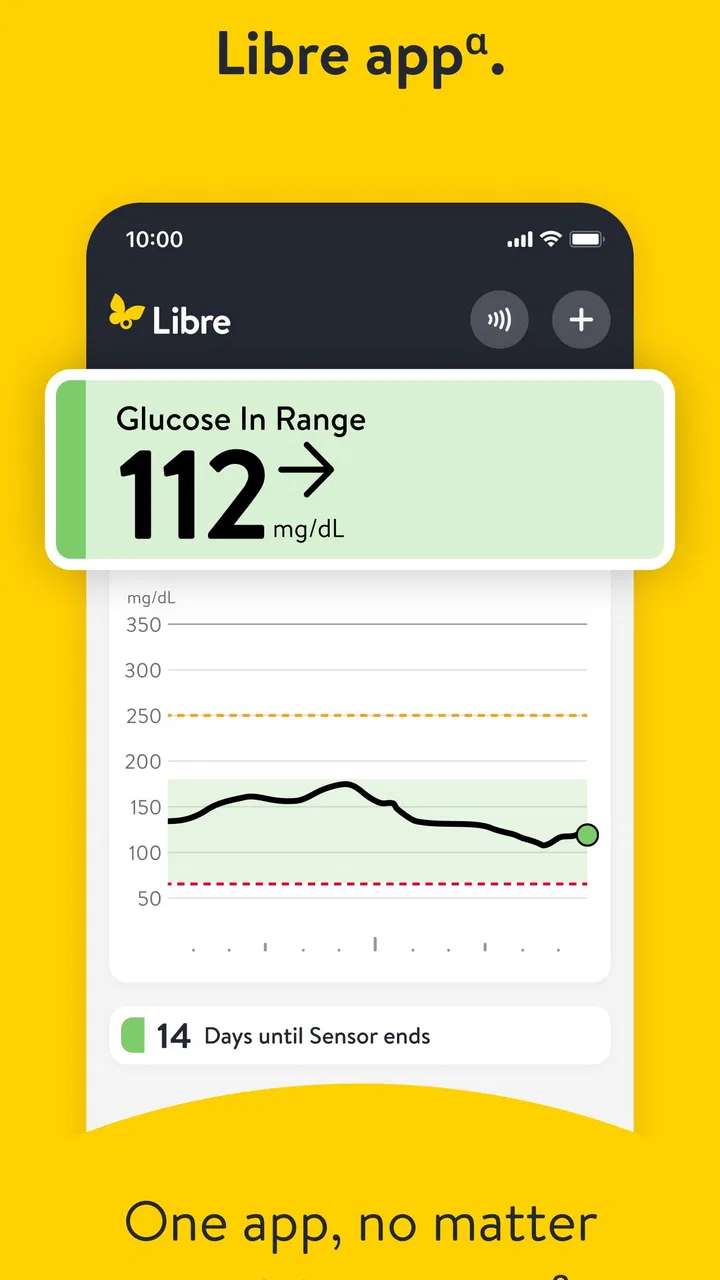
In a normal day, I would expect the most useful workflow to be quick rather than elaborate. Before breakfast, I could check the current glucose reading and its direction, then look again before leaving home or starting work. Later, a glance after a meal could help me understand whether my level is moving steadily or changing quickly. The practical benefit is not merely seeing a number; it is having more context for a conversation with a healthcare professional and for the routines I have already been advised to follow.
That distinction is important. A continuous glucose monitoring app can make information easier to see, but it does not replace clinical guidance. I would use Libre to observe and organize my readings, not to independently change medication or treat a serious low or high reading without following my care plan. The app can support decisions, but it should not become the decision-maker.
I also like the possibility of checking information discreetly. Someone working at a desk, commuting, caring for children, or exercising may not want to stop and use a separate device every time. Having the app on a phone can reduce that interruption. At the same time, the phone becomes part of the monitoring routine, so keeping it charged, nearby, and compatible is not a minor detail. A convenient app is only convenient when the surrounding setup is dependable.
Who gets the most value from it
Libre makes the most sense for an existing Libre user who wants a phone-centered way to follow glucose information. It can also be useful for a person who is beginning to pay closer attention to patterns and needs a straightforward place to review what happens across a day. The app’s free price removes one obvious barrier, which is helpful when the larger cost and suitability questions are already being handled through a healthcare plan and the relevant monitoring equipment.
Families and caregivers may also appreciate having a familiar digital view available during ordinary routines, but I would be careful about assuming that the app alone solves every sharing or supervision need. If another person must reliably monitor readings from a distance, I would first check whether the exact Libre setup and account arrangement support that workflow. The app should be chosen for the functions it actually provides in your configuration, not for assumptions based on other diabetes platforms.
On the other hand, this is not the right choice for someone looking for a broad nutrition coach, a workout planner, or a general symptom journal. It is also a poor fit for a person whose phone cannot run the required operating system or whose monitoring device is not compatible with the app. In those cases, a dedicated reader or another clinically appropriate system may be more practical.
A realistic day with the app
Imagine a user who starts work early and often feels that a single morning check tells only part of the story. With Libre, the useful routine would be to look at the reading before breakfast, note the direction, and check again later rather than treating the first result as the whole day’s picture. After lunch, the user could review the change and bring a clear pattern to a scheduled medical appointment instead of relying on memory.
The important insight here is that the app becomes more useful when the user asks consistent questions of the information. “What is my reading right now?” is helpful, but “What tends to happen after this meal or activity?” is more actionable for a long-term discussion with a professional. I would avoid turning every fluctuation into a problem. The goal is to notice recurring behavior, not to chase every movement with an improvised response.
A second practical tip is to review the app at calm moments, not only when something feels wrong. Looking back after the day has ended can reveal a pattern that is easy to miss during a busy shift. That habit also reduces the temptation to judge the entire day by one reading. For me, this is where a monitoring app earns its place: it helps turn scattered checks into a more understandable record.
What the current release tells me
The current version is 1.2.0, and the app was released on April 7, 2025. I see that as a relatively early stage in the product’s visible lifecycle rather than evidence of a mature, feature-heavy platform. The sensible expectation is a focused experience that may continue to receive refinements, but I would separate that expectation from what is available today. A future update might improve convenience; it should not be treated as a promised feature.
That early version also changes how I judge the app. I care less about whether it includes every tool found in older diabetes platforms and more about whether its central monitoring workflow is dependable and understandable. A new app can be worthwhile if it makes the essential task clear. It can also be frustrating if users encounter rough edges around setup, compatibility, or everyday phone use.
The public response is encouraging without being overwhelming: Libre has an average rating of 4.2 from around seventeen thousand ratings, with roughly three thousand seven hundred written reviews and over one hundred thousand installs. I would read those figures as evidence of meaningful interest and generally positive reception, not as a guarantee that every device or user experience will be smooth.
Because Abbott Diabetes Care Inc. develops the app, existing Abbott users may find the product choice more natural than moving to an unrelated platform. That connection can reduce confusion when the monitoring hardware and mobile software are intended to work together. It also means that the app’s usefulness is tied to staying within the supported Libre ecosystem, which may feel limiting if you prefer to combine tools from different manufacturers.
The effect on people already using Libre
For an existing user, the biggest change is likely to be convenience rather than a completely new approach to diabetes management. A phone-based experience can make glucose information easier to consult during ordinary activities. If you already have a routine built around Libre, the app may fit into it without asking you to rethink everything.
Still, I would not switch devices or abandon a trusted backup method immediately after installing it. When health information matters, I prefer a gradual transition: install the app, confirm that the monitoring workflow behaves as expected, and keep the established method available until I am comfortable. This is especially sensible for people who depend on timely readings and cannot afford to discover a compatibility problem during a busy day.
Another non-obvious trade-off is attention. A phone makes access easy, but it also places glucose information beside messages, calls, and distractions. Some users may check more often because the information is always close; others may find that notifications and general phone use make the experience less focused. I would create specific checking habits instead of opening the app impulsively throughout the day.
Existing users should also think about how they communicate with clinicians. The most useful review is not simply a screenshot of a single reading. Before an appointment, I would note the periods that repeatedly seem unusual, the meals or activities associated with them, and any symptoms or treatment instructions that matter. The app can be part of that preparation, but the quality of the conversation still depends on the user’s notes and the clinician’s interpretation.
Where the experience may fall short
The first limitation is compatibility. Requiring Android or iOS 11 and later is reasonable for a modern app, but it excludes older phones. If your device is aging, the cost of replacing it may outweigh the convenience of moving to a phone-based workflow. A dedicated reader can be the better choice when reliability and independence from a smartphone matter more than having everything in one place.
The second limitation is that continuous information can create false confidence. Seeing a stream of readings may feel more complete than occasional checks, but it does not eliminate the need to understand symptoms, follow professional instructions, or respond appropriately when something seems urgent. I would never let the app’s calm interface persuade me that a concerning situation is harmless.
There is also a learning curve in interpreting trends. A reading that is moving upward or downward needs context: recent food, activity, medication, stress, illness, and timing can all matter. New users may initially focus too much on the current value and too little on the broader pattern. My advice is to learn the meaning of the indicators in the context of the official Libre instructions and your healthcare team, rather than guessing from the screen.
Compared with a conventional glucose meter, Libre can offer a richer view of change over time, while a meter may feel more familiar and direct for users who prefer occasional checks. Compared with a dedicated reader, the smartphone app is more convenient for many people but more dependent on phone readiness. Compared with broader diabetes-management platforms, Libre’s focused purpose may be easier to understand, although users wanting extensive logging or cross-device coordination may prefer a different ecosystem.
That comparison also explains why I would not recommend choosing it solely because it is free. The app itself costs nothing, but the complete monitoring experience depends on the compatible Libre setup and on whether the phone-based workflow suits you. The right question is not “Is this the cheapest app?” but “Does this fit the equipment, guidance, and daily habits I already need?”
Small habits that make it more useful
I would begin by checking compatibility before changing my routine. Confirm that the phone meets the operating-system requirement and that the intended Libre equipment is supported in the way I need. This simple step prevents a common mistake: assuming that any phone and any Libre component will provide the same experience.
Next, I would choose a few repeatable moments for checking rather than opening the app randomly. Morning, before a main meal, after a familiar activity, and during an evening review can create a useful rhythm, provided those moments fit the person’s clinical instructions. The value comes from consistency, not from collecting the largest possible number of casual glances.
I would also keep a short note beside the readings when something unusual happens. A note such as “long walk,” “late meal,” or “felt unwell” can make a later pattern much easier to discuss. This is one of the app’s practical trade-offs: glucose information is powerful, but it becomes more meaningful when paired with the circumstances around it.
Finally, I would decide in advance what I will do when a reading conflicts with how I feel or with the instructions I have been given. The answer should come from the care plan and official guidance, not from an improvised interpretation of the app. That preparation is more valuable than simply knowing where every screen is located.
What I would watch as the product evolves
Since version 1.2.0 is still an early point in the app’s release history, I would watch future updates for improvements that reduce friction around setup, compatibility, and reviewing patterns. I would be particularly interested in whether the central monitoring experience becomes clearer without becoming cluttered. For a medical app, a smaller number of understandable tools is preferable to a long list of impressive but confusing additions.
I would also pay attention to how existing users describe day-to-day reliability across different phones and routines. A strong average rating is useful context, but written experiences often reveal the practical details that matter most: whether the app fits a workday, whether the transition from another method feels smooth, and whether users understand what the readings mean.
My expectations would remain measured. I would welcome better guidance and smoother workflows, but I would not assume that a future update will transform Libre into a full diabetes-management suite. Its strongest identity is as a focused continuous glucose monitoring companion. Preserving that clarity may be more important than adding every feature found in competing products.
For readers deciding today, my recommendation is straightforward. Choose Libre if you already use the compatible Abbott ecosystem, want glucose information on a phone, and are willing to build a calm, consistent review habit around it. Consider a dedicated reader or another platform if your phone is unsupported, you need a different kind of remote or multi-tool workflow, or you prefer a broader health-management system.
Overall, I see Libre as a useful, focused medical app rather than a complete answer to every diabetes need. Its free access, phone-centered convenience, and connection to Abbott Diabetes Care Inc. make it appealing for the right user. Its limitations are just as important: compatibility matters, interpretation requires care, and the app should support—not replace—professional advice. The best results come from using the readings as context for thoughtful decisions, not as instructions on their own.
With an Everyone content rating and a growing user base, it is approachable for a wide audience, but approachability should not be confused with simplicity of diabetes care. I would recommend trying it carefully, keeping a reliable backup during the transition, and judging it by how naturally it supports your real routine. For an Abbott user who wants continuous glucose monitoring close at hand, that can be a meaningful improvement; for everyone else, compatibility and clinical fit should come before convenience.
FAQs for Libre by Abbott
01What is Libre by Abbott and how does it work?
Libre by Abbott is a continuous glucose monitoring (CGM) system designed to help individuals with diabetes manage their blood sugar levels. It consists of a small sensor worn on the back of the upper arm, which measures glucose levels in the interstitial fluid. Users can scan the sensor with a compatible device or smartphone app to get real-time data and trends.
02Is the Libre system suitable for all types of diabetes?
Libre by Abbott is primarily intended for people with Type 1 and Type 2 diabetes who need regular monitoring of their blood sugar levels. However, it's essential for users to consult with their healthcare provider to determine if the Libre system is appropriate for their specific condition and how it can fit into their overall diabetes management plan.
03How long does the Libre sensor last, and is it easy to apply?
Each Libre sensor is designed to last for up to 14 days. It's relatively easy to apply using the applicator provided in the package. The process is straightforward, and detailed instructions are included to ensure proper placement. Once applied, the sensor is waterproof and can be worn while showering, swimming, or exercising.
04What devices are compatible with the Libre app?
The Libre app is compatible with various Android and iOS devices. Users should check the official website or app store listings to ensure their specific smartphone or device meets the minimum system requirements. Compatibility ensures seamless scanning and data synchronization between the sensor and the app.
05Are there any additional costs associated with using Libre by Abbott?
While the initial cost of the Libre reader and sensors is evident, users should be aware of potential ongoing expenses. These include purchasing new sensors every two weeks and any additional accessories they may need. Some insurance plans might cover part or all of these costs, so it's advisable to check with your insurance provider.
Pros
- Easy glucose monitoring via sensors.
- No finger pricks needed for testing.
- User-friendly app interface.
- Real-time glucose level updates.
- Compatible with both Android and iOS.
Cons
- Initial sensor setup can be tricky.
- Limited app features without subscription.
- Sensor adhesive may cause irritation.
- Requires frequent sensor replacements.
- App notifications can be overwhelming.

Libre by Abbott
Gallery